
Playing Garrisonbet Casino on mobile
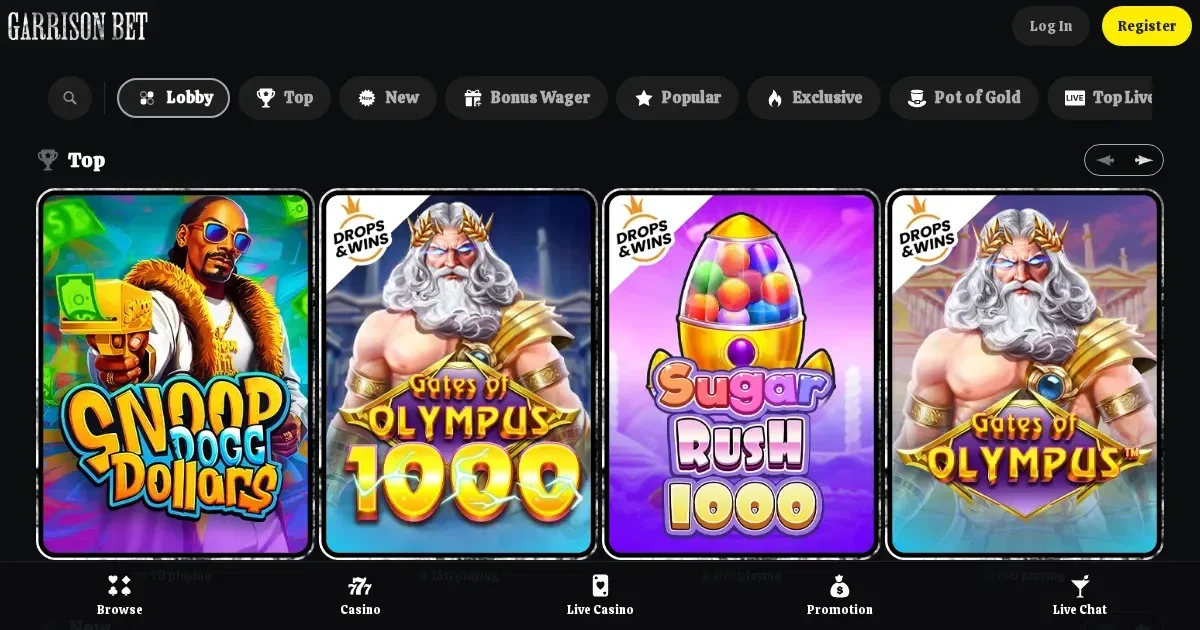
















Before you play from a phone
A few things worth checking before you settle into a session on Garrisonbet Casino from your mobile: your device needs a stable connection (4G or Wi-Fi recommended for live games), a modern browser (Chrome, Safari or Firefox), and enough screen space to read bet slips and game controls clearly. The platform runs entirely in the browser—no download, no app install, no permissions to grant. Open the site, log in if you already have an account, and the interface adapts to whatever screen size you are using.
Battery drain is real when streaming live dealer tables or running graphically rich slots for an hour. Keep your phone charged or plugged in during longer sessions. Garrisonbet Casino does not publish system requirements, but any device from the past three years running iOS, Android or a current desktop OS should handle the load without trouble.
Mobile at Garrisonbet Casino
The operator runs a browser-based casino available to players in multiple currencies including EUR, USD, CAD, GBP, PLN and twelve others. You access it by typing the domain into your phone's browser—the layout reorganises itself for portrait or landscape, buttons grow large enough to tap accurately, and the game grid collapses into a scrollable single column. There is no native iOS or Android application published by the operator, and the site does not prompt you to install one.
Everything a desktop user sees is technically reachable on mobile: slots, live tables categorised under Roulette, Blackjack and Game Shows, the cashier, support via email and web chat, and your account settings. The interface prioritises simplicity—minimal decoration, a burger menu for categories, and a persistent footer with links to the cashier and your profile.
Installed app versus site in a browser
Garrisonbet Casino runs exclusively as a website. You will not find it on the App Store or Google Play, and the operator does not distribute an APK. The browser route has one clear advantage: no storage footprint on your device, no update prompts, and no separate login to remember. The downside is that you cannot pin a true app icon to your home screen with the same offline resilience a native build would offer, though most mobile browsers let you save a shortcut that opens the site in a chromeless window.
Push notifications for promotions, tournament reminders or withdrawal confirmations are not available—those require a native app or explicit browser permission, neither of which the operator currently uses. If you want to track an active bonus or check on a pending withdrawal, you will need to open the site manually and navigate to your account area.
Day-to-day use from a phone
Depositing works identically to the desktop flow: tap the cashier icon, pick a method from bank cards, e-wallets or bank account transfers, enter an amount and confirm. Minimum and maximum deposit limits depend on the method you choose and appear at selection time. Any deposit must be wagered three times before funds connected to it can be withdrawn—that rule applies whether you deposited from a laptop or a phone, and the three-times-turnover requirement does not vanish simply because you switched devices mid-session.
Withdrawals follow the same drill. Tap through to the cashier, choose a withdrawal method (bank transfer or credit card), enter the amount, and submit. All payout requests are processed within three business days, not counting additional time your bank or card issuer might add. Daily, weekly and monthly withdrawal limits exist but are not published in absolute figures—they depend on the payment method and your VIP level if you have one. The operator reserves the right to pay large wins in monthly instalments if they exceed the applicable monthly cap.
| Task | Mobile browser |
|---|---|
| Registration | Full process available; typing on a small keyboard is slower |
| Deposits | Same methods and limits as desktop |
| Game library | All categories load; some older titles may not be touch-optimised |
| Live casino | Works well on Wi-Fi; video quality drops on weak 4G |
| Withdrawals | Full cashier access; processing times unchanged |
| Support | Email and web chat both available |
| Account settings | Limits, self-exclusion and profile edits all reachable |
Live dealer tables stream smoothly on a stable connection but stutter or drop frames if your signal weakens. The chat panel beside the video feed shrinks to a narrow strip on portrait screens, making it harder to follow conversation or read bet history. Roulette and blackjack interfaces fare better than baccarat or game-show formats, where multiple camera angles and on-screen graphics compete for limited space.
Known limits on a small screen
Some tasks grow fiddly on mobile. Uploading verification documents—required when your total deposits exceed EUR 2,000, at your first withdrawal, or for any transaction the operator deems suspicious—means photographing your ID, a selfie holding that ID, and a proof of residence, then attaching each file through a form that was designed for desktop drag-and-drop. Most phone cameras produce files large enough to slow the upload, and the interface does not always confirm success until you refresh the page.
Bonus wagering progress is tucked inside the account menu rather than displayed on the main screen. If you are working through a deposit bonus with a stated multiplier and game-contribution percentages, you will need to navigate away from the game itself to check how much playthrough remains. The maximum bet cap while a bonus is active—5 EUR, 5 USD or the currency equivalent—applies on mobile exactly as it does on desktop, and breaching it is flagged as bonus abuse regardless of whether you tapped a slider by accident or placed the bet deliberately.
Tournament leaderboards and promotional calendars exist on the site—categories include Peaky Tournament, Drops & Wins, Spinoleague and others—but on a narrow screen the tables compress into a scrolling mess of player names and prize tiers. You can enter these events from a phone, but tracking your rank in real time is easier on a larger display.
What to check first
Start with the basics. Log in, tap through to the cashier, and confirm your preferred deposit method is listed. Not every e-wallet or card brand appears on every operator, and discovering a mismatch mid-session wastes time. Next, load a slot or a live table you recognise and play a few low-stakes rounds to test responsiveness—lag that is barely noticeable on desktop becomes disruptive when you are tapping a touchscreen, and some older games simply were not built for touch input.
Check your battery percentage and your data allowance if you are on cellular. An hour of live blackjack can consume 200–300 MB depending on video quality, and a phone that dies mid-hand forfeits the round. Set a deposit limit in your account settings if you have not already—Garrisonbet Casino allows players to impose stake caps, and any change takes effect 24 hours after you save it. That delay exists to prevent impulsive adjustments, which is useful when you are playing from a device you carry everywhere.
Responsible play on a device you always carry
A casino in your pocket means access is frictionless, which is convenient until it is not. The same phone that lets you play a few spins while waiting for a bus also tempts you to play when you should not—late at night, after a loss you want to chase, or in situations where your attention is divided. Gambling is entertainment, not a reflex or a way to pass dead time, and treating it otherwise turns recreation into a problem faster than most people expect.
If you share a device with someone under 18, enable parental controls (iOS Screen Time, Android Digital Wellbeing, or third-party tools such as Net Nanny or Qustodio) to block casino domains and prevent accidental access. The legal gambling age in the UK is 18+, and that restriction applies regardless of who owns the phone.
Garrisonbet Casino offers voluntary self-exclusion (closing or restricting your account for a set period) and stake limits (capping the maximum amount you can wager). Both tools are available through your account settings on mobile and desktop alike. If gambling stops feeling like a choice you are making freely, GamCare runs a free, confidential helpline at 0808 8020 133 (24/7), and BeGambleAware offers online support at begambleaware.org. GamStop (gamstop.co.uk) provides free national self-exclusion across licensed UK sites, and blocking software such as Gamban or BetBlocker (free, multi-platform) prevents access at the device level if you need that layer of control.
For any questions about this page or the information we publish, write to [email protected]. We aim to respond within 48 hours.
This page is for information and marketing purposes only. We are not a casino operator, a bookmaker or an organiser of gambling. Access to this content is restricted to persons aged 18 and over (18+). We encourage you to gamble responsibly—for free, confidential support visit BeGambleAware.org.
Game Providers